
Windows Server 2025 introduces major security, identity, and platform improvements, but it also continues Microsoft’s cleanup of older components, protocols, and management tools. For administrators, this matters because some features are fully removed and no longer available, while others are only deprecated, meaning they still exist today but are no longer under active development and could disappear in a future release. For more information, refer to the link: Features Removed or No Longer Developed in Windows Server | Microsoft Learn.
Contents
Deprecated vs. Removed
A deprecated feature is still present in Windows Server, remains supported for production use, and continues to receive security and quality updates according to the product lifecycle. However, Microsoft is no longer actively developing it, and it may be removed in a future release. A removed feature, on the other hand, is no longer available in the installed product image, and applications or workflows that depended on it must move to an alternative.
Features Removed in Windows Server 2025
These are the most important features that are now removed from Windows Server 2025 and require migration or replacement planning.
1. Internet Explorer standalone application
Microsoft removed the standalone Internet Explorer application from Windows Server 2025. If you still depend on older line-of-business sites, the supported path is to use Internet Explorer mode in Microsoft Edge instead of the old IE desktop app.
2. NTLMv1
NTLMv1 is removed starting with Windows Server 2025. Microsoft recommends replacing direct NTLM usage with Negotiate, which prefers Kerberos and only falls back to NTLM when required. This is one of the most important security-related removals because it affects older authentication workflows, scripts, appliances, and legacy integrations that still rely on NTLMv1.
3. Data Encryption Standard (DES)
DES is removed from Windows Server 2025. Microsoft states that DES is not considered secure against modern cryptographic attacks and has long been superseded by stronger encryption algorithms. Any legacy dependency on DES-based authentication or encryption should be treated as a modernization priority. (Microsoft Learn)
4. Windows PowerShell 2.0
Starting with the September 2025 update, Windows Server 2025 no longer includes Windows PowerShell 2.0. If PowerShell 2.0 had been installed before that update, it can no longer be used. The supported direction is to migrate old scripts and components to PowerShell 5.0 or later, with PowerShell 7.x often the practical choice for modern automation.
5. SMTP Server feature
The built-in SMTP Server feature is removed from Windows Server 2025. There is no replacement within the operating system, and it suggests using Exchange Server or a non-Microsoft SMTP server instead. If you had applications relaying mail through the old SMTP service, this is a direct breaking change that needs remediation.
6. WordPad
WordPad is removed from Windows Server 2025. Microsoft recommends using Microsoft Word for rich text formats such as .doc and .rtf, and Notepad for plain text files such as .txt. This is not usually operationally critical, but it can affect jump hosts, admin servers, and procedural documents that assumed WordPad was available by default.
Features Deprecated in Windows Server 2025
These components still exist in Windows Server 2025, but Microsoft is no longer actively developing them and expects customers to move away over time.
1. TLS 1.0 and TLS 1.1
TLS 1.0 and TLS 1.1 are deprecated and are disabled by default in Windows Server 2025 due to modern security expectations and internet standards. This does not necessarily mean they are instantly gone everywhere, but any remaining dependency on them should be treated as technical debt and remediated as soon as possible.
2. WMIC
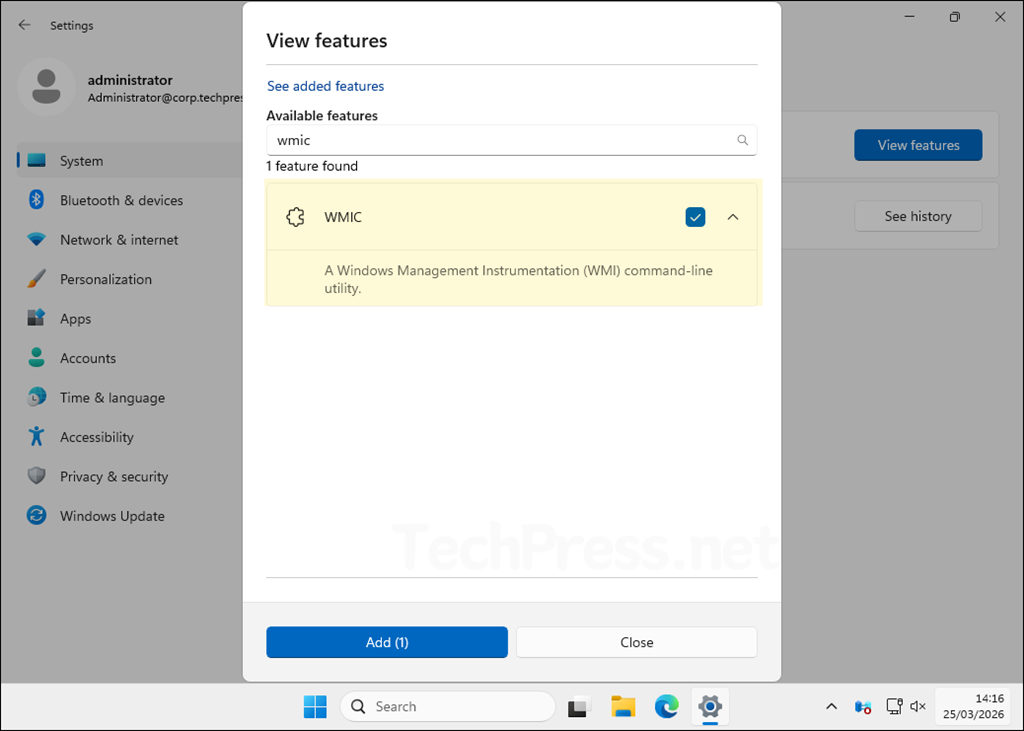
The Windows Management Instrumentation Command-line utility, better known as WMIC, is deprecated. Beginning with Windows Server 2025, it is available only as a Feature on Demand, and it will be removed from Windows in a future release. The recommended replacement is PowerShell for WMI or direct programmatic WMI queries.
3. VBScript
VBScript is deprecated. In Windows Server 2025, it is still available as a Feature on Demand and is preinstalled, but it will be removed from the operating system in a later release. The preferred replacement for admin automation is PowerShell, and for web scenarios, Microsoft recommends JavaScript.
4. Windows Internal Database (WID)
Windows Internal Database is deprecated and will be removed from Windows in a future release. WID is used by several roles, including AD FS, AD RMS, IPAM, RD Connection Broker, and WSUS; consider using SQL Server editions instead. This is an important roadmap item because the dependency is often indirect: admins may not realize a server role still relies on WID underneath.
5. WSUS
Windows Server Update Services (WSUS) is no longer actively developed; all existing capabilities and content continue to be available for deployments. In practical terms, WSUS is not removed, but it is clearly no longer a strategic investment area. Organizations should read this as a signal to evaluate more modern servicing approaches where appropriate.
6. RC4 in Kerberos
Use of RC4 in Kerberos is deprecated. RC4 is a weak algorithm; use stronger algorithms such as AES-SHA1 are recommended instead. This matters in environments with old trusts, legacy applications, or devices that still negotiate RC4-based Kerberos encryption.
7. NTLM overall
LANMAN and NTLMv2 are deprecated, and NTLMv2 will continue to work for now but will be removed from Windows Server in a future release. That means Windows Server 2025 is part of a broader authentication transition, not just a one-off NTLMv1 cleanup.
8. Network Load Balancing (NLB)
Network Load Balancing is deprecated and no longer in active development. Microsoft points customers toward Software Load Balancer (SLB) in Software-Defined Networking as the alternative path. Environments still depending on traditional NLB should start planning migration, especially for new builds.
9. Failover Clustering Cluster Sets
The Failover Clustering Cluster Sets feature is deprecated and no longer in active development. This will mainly matter to specialized clustering scenarios and large-scale virtualization environments that adopted Cluster Sets.
10. WebDAV Redirector service
The WebDAV Redirector service is deprecated and is not installed by default in Windows Server. If older document workflows or mapped WebDAV-based locations are still used, those dependencies should be reviewed.
11. Computer Browser
The Computer Browser driver and service are deprecated. Microsoft describes it as a dated and insecure device location protocol and notes it had already effectively fallen out of favor with SMB1 removal. This is mainly relevant in ancient, discovery-dependent environments.
12. Remote Mailslots
Remote mailslots are deprecated. Microsoft characterizes the protocol as old, unreliable, and insecure. For most current deployments, this is only relevant when dealing with ancient applications or legacy device discovery patterns.
WINS Deprecation
The Windows message center states WINS was officially deprecated starting with Windows Server 2022 and will be removed from Windows Server releases after Windows Server 2025. Microsoft also says standard support for it continues through the Windows Server 2025 lifecycle, until November 2034, and recommends migrating to DNS-based name resolution. So while WINS is not suddenly gone in Windows Server 2025, it is clearly on borrowed time.
What these changes mean for administrators
The overall direction in Windows Server 2025 is clear. Microsoft is reducing dependence on older authentication methods, weak cryptography, legacy admin shells, dated browser and mail components, and aging management tools. In practice, the biggest real-world impact areas are usually:
- Authentication and security hardening, especially around NTLMv1 removal, NTLM deprecation, RC4 deprecation, and TLS 1.0/1.1 being disabled by default.
- Automation and scripting, particularly if your environment still uses WMIC, VBScript, or PowerShell 2.0.
- Application compatibility, where older line-of-business apps may assume Internet Explorer, SMTP Server, DES, or old database back ends such as WID.
- Servicing strategy, because WSUS still works but is no longer under active development, which makes long-term update-management planning more important.
Recommended migration actions before or during a Windows Server 2025 rollout
A sensible Windows Server 2025 readiness checklist would include the following:
- Audit authentication usage and identify any NTLMv1, RC4, DES, or TLS 1.0/1.1 dependencies. These are the changes most likely to cause unexpected legacy compatibility issues.
- Inventory scripts and admin tools for WMIC, VBScript, and PowerShell 2.0 usage. Migrate them to PowerShell 5.1 or PowerShell 7 and modern management cmdlets where possible.
- Review server roles that rely on WID, such as WSUS, AD FS, or IPAM, and decide whether a SQL-based back end should be part of your long-term architecture.
- Validate application mail relay requirements if any app previously used the built-in SMTP Server feature, because that component is removed and has no in-box replacement.
- Replace Internet Explorer dependencies with Microsoft Edge IE mode where legacy web apps still require it.
- Treat WSUS as stable but not strategic. If you still use it, it remains functional, but it is wise to plan around the fact that Microsoft is no longer actively developing it.
Final thoughts
Windows Server 2025 does not just add new capabilities; it also pushes administrators further toward modern security, automation, and servicing models. The headline removals are Internet Explorer, NTLMv1, DES, SMTP Server, WordPad, and, from the September 2025 update, Windows PowerShell 2.0. The most important deprecated items to watch are WMIC, VBScript, WID, WSUS, RC4 in Kerberos, NLB, TLS 1.0/1.1, and the broader move away from NTLM. Organizations that identify these dependencies early will have a much smoother Windows Server 2025 deployment and upgrade experience.
