
In this post, I will show you how to export Conditional Access Policies to CSV with PowerShell. Conditional Access (CA) policies are one of the highest impact control planes in Microsoft Entra ID. Exporting them regularly gives you a practical “configuration backup” you can analyze over time, review for drift, and use for governance (change control, audits, and peer reviews). The most reliable and supported way to export CA policies today is via Microsoft Graph (v1.0) using the Microsoft Graph PowerShell SDK.
Prerequisites
Before you run any export, make sure the account or automation identity can actually read CA policies through Graph.
- Required admin roles: Your signed-in identity must have a supported Entra role to read Conditional Access policies in delegated scenarios. Supported roles: Global Reader, Conditional Access Administrator, Security Reader, Security Administrator, and Global Secure Access Administrator.
- Required Microsoft Graph permissions: For exporting CA policies via Microsoft Graph v1.0, least-privileged permission for this API is Policy.Read.All (delegated or application).
- PowerShell Modules: You need the Microsoft Graph PowerShell SDK module that contains the Conditional Access cmdlets: Microsoft.Graph.Authentication and Microsoft.Graph.Identity.SignIns (contains Get-MgIdentityConditionalAccessPolicy)
Export Conditional Access Policies to CSV
You must install the Microsoft Graph PowerShell module on your device if it is not already installed, and then run below script. The script uses the Connect-MgGraph cmdlet to establish a connection with the required scopes. If you prefer application-based authentication, you can use the (-apponly) $AppOnly switch along with the ClientId and ClientSecret parameters. Otherwise, the script uses delegated authentication by default.
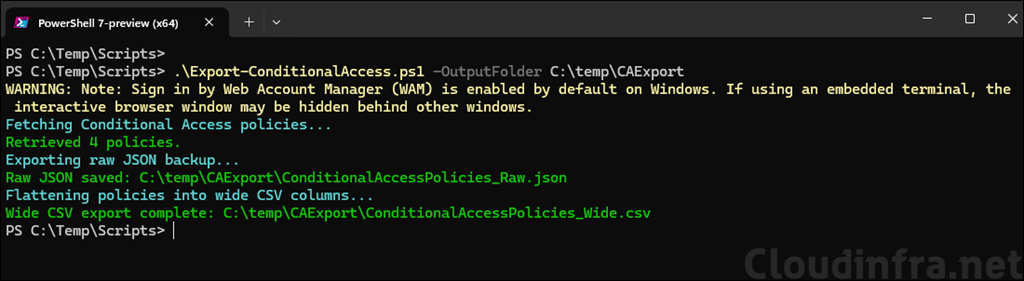
You can also download this script from my GitHub repo: Export-ConditionalAccess.ps1 · GitHub or copy the code below, save it in the Export-ConditionalAccess.ps1 file and execute it on the PowerShell console.
Install Microsoft Graph PowerShell module
Install-Module Microsoft.Graph -Scope AllUsers -AllowClobber -ForceExport-ConditionalAccess.ps1
<#
.SYNOPSIS
  Export Microsoft Entra Conditional Access policies to a fully expanded (flattened) CSV + optional raw JSON.

.PREREQS
  Install-Module Microsoft.Graph.Authentication -Scope CurrentUser
  Install-Module Microsoft.Graph.Identity.SignIns   -Scope CurrentUser

  Delegated permission: Policy.Read.All
  App-only permission: Policy.Read.All (Application) + admin consent
#>

[CmdletBinding()]
param(
  [Parameter(Mandatory = $true)]
  [ValidateNotNullOrEmpty()]
  [string]$OutputFolder,

  [Parameter(Mandatory = $false)]
  [string]$WideCsvName = "ConditionalAccessPolicies_Wide.csv",

  [Parameter(Mandatory = $false)]
  [string]$RawJsonName = "ConditionalAccessPolicies_Raw.json",

  [Parameter(Mandatory = $false)]
  [bool]$ExportRawJson = $true,

  [Parameter(Mandatory = $false)]
  [switch]$AppOnly,

  [Parameter(Mandatory = $false)]
  [string]$TenantId,

  [Parameter(Mandatory = $false)]
  [string]$ClientId,

  [Parameter(Mandatory = $false)]
  [string]$CertificateThumbprint,

  [Parameter(Mandatory = $false)]
  [string]$ArrayJoinDelimiter = ";",

  # If WAM popup is hidden in your terminal, switch this on
  [Parameter(Mandatory = $false)]
  [switch]$UseDeviceCode
)

$ErrorActionPreference = "Stop"

function Ensure-Folder {
  param([Parameter(Mandatory)] [string]$Path)
  if (-not (Test-Path -Path $Path)) {
    New-Item -ItemType Directory -Path $Path | Out-Null
  }
}

function Assert-Module {
  param([Parameter(Mandatory)] [string]$Name)
  if (-not (Get-Module -ListAvailable -Name $Name)) {
    throw "Required module '$Name' is not installed. Run: Install-Module $Name -Scope CurrentUser"
  }
}

function Flatten-Object {
  [CmdletBinding()]
  param(
    [Parameter(Mandatory = $false)]
    [AllowNull()]
    $InputObject,

    [Parameter(Mandatory = $false)]
    [string]$Prefix = "",

    [Parameter(Mandatory = $false)]
    [hashtable]$Result = @{} ,

    [Parameter(Mandatory = $false)]
    [string]$Separator = ".",

    [Parameter(Mandatory = $false)]
    [switch]$JoinScalarArrays,

    [Parameter(Mandatory = $false)]
    [string]$ArrayJoinDelimiter = ";",

    [Parameter(Mandatory = $false)]
    [string[]]$ExcludePropertyNames = @("AdditionalProperties","BackingStore","OdataType","@odata.type")
  )

  if ($null -eq $InputObject) {
    if ($Prefix -and -not $Result.ContainsKey($Prefix)) { $Result[$Prefix] = "" }
    return $Result
  }

  # IDictionary
  if ($InputObject -is [System.Collections.IDictionary]) {
    foreach ($k in $InputObject.Keys) {
      if ($ExcludePropertyNames -contains $k) { continue }

      $v = $InputObject[$k]
      $newPrefix = if ($Prefix) { "$Prefix$Separator$k" } else { "$k" }

      if ($null -eq $v) {
        if (-not $Result.ContainsKey($newPrefix)) { $Result[$newPrefix] = "" }
        continue
      }

      Flatten-Object -InputObject $v -Prefix $newPrefix -Result $Result -Separator $Separator `
        -JoinScalarArrays:$JoinScalarArrays -ArrayJoinDelimiter $ArrayJoinDelimiter -ExcludePropertyNames $ExcludePropertyNames | Out-Null
    }
    return $Result
  }

  # IEnumerable but not string
  if (($InputObject -is [System.Collections.IEnumerable]) -and -not ($InputObject -is [string])) {

    $items = @($InputObject)

    if ($items.Count -eq 0) {
      if ($Prefix -and -not $Result.ContainsKey($Prefix)) { $Result[$Prefix] = "" }
      return $Result
    }

    $allScalar = $true
    foreach ($it in $items) {
      if ($null -eq $it) { continue }
      if (($it -is [string]) -or ($it -is [ValueType])) { continue }
      $allScalar = $false
      break
    }

    if ($JoinScalarArrays -and $allScalar) {
      $joined = ($items | Where-Object { $_ -ne $null -and "$_".Trim() -ne "" } | ForEach-Object { "$_" }) -join $ArrayJoinDelimiter
      if ($Prefix) { $Result[$Prefix] = $joined }
      return $Result
    }

    for ($i = 0; $i -lt $items.Count; $i++) {
      $it = $items[$i]
      $newPrefix = if ($Prefix) { "$Prefix$Separator$i" } else { "$i" }

      if ($null -eq $it) {
        if (-not $Result.ContainsKey($newPrefix)) { $Result[$newPrefix] = "" }
        continue
      }

      Flatten-Object -InputObject $it -Prefix $newPrefix -Result $Result -Separator $Separator `
        -JoinScalarArrays:$JoinScalarArrays -ArrayJoinDelimiter $ArrayJoinDelimiter -ExcludePropertyNames $ExcludePropertyNames | Out-Null
    }
    return $Result
  }

  # Scalar
  if (($InputObject -is [string]) -or ($InputObject -is [ValueType])) {
    if ($Prefix) { $Result[$Prefix] = "$InputObject" }
    return $Result
  }

  # Complex object
  $props = $InputObject.PSObject.Properties | Where-Object { $_.MemberType -in @("NoteProperty","Property") }
  if (-not $props -or $props.Count -eq 0) {
    if ($Prefix) { $Result[$Prefix] = "$InputObject" }
    return $Result
  }

  foreach ($prop in $props) {
    $name = $prop.Name
    if ($ExcludePropertyNames -contains $name) { continue }

    $val  = $prop.Value
    $newPrefix = if ($Prefix) { "$Prefix$Separator$name" } else { "$name" }

    if ($null -eq $val) {
      if (-not $Result.ContainsKey($newPrefix)) { $Result[$newPrefix] = "" }
      continue
    }

    Flatten-Object -InputObject $val -Prefix $newPrefix -Result $Result -Separator $Separator `
      -JoinScalarArrays:$JoinScalarArrays -ArrayJoinDelimiter $ArrayJoinDelimiter -ExcludePropertyNames $ExcludePropertyNames | Out-Null
  }

  return $Result
}

# -------------------- Main --------------------

Ensure-Folder -Path $OutputFolder

$csvPath  = Join-Path $OutputFolder $WideCsvName
$jsonPath = Join-Path $OutputFolder $RawJsonName

Assert-Module -Name "Microsoft.Graph.Authentication"
Assert-Module -Name "Microsoft.Graph.Identity.SignIns"

Import-Module Microsoft.Graph.Authentication -ErrorAction Stop
Import-Module Microsoft.Graph.Identity.SignIns -ErrorAction Stop

# Connect
if ($AppOnly) {
  if ([string]::IsNullOrWhiteSpace($TenantId) -or
      [string]::IsNullOrWhiteSpace($ClientId) -or
      [string]::IsNullOrWhiteSpace($CertificateThumbprint)) {
    throw "For -AppOnly provide -TenantId, -ClientId, -CertificateThumbprint."
  }
  Connect-MgGraph -TenantId $TenantId -ClientId $ClientId -CertificateThumbprint $CertificateThumbprint -NoWelcome
}
else {
  if ($UseDeviceCode) {
    Connect-MgGraph -Scopes "Policy.Read.All" -UseDeviceCode -NoWelcome
  }
  else {
    Connect-MgGraph -Scopes "Policy.Read.All" -NoWelcome
  }
}

#Select-MgProfile -Name "v1.0" | Out-Null

try {
  Write-Host "Fetching Conditional Access policies..." -ForegroundColor Cyan
  $policies = Get-MgIdentityConditionalAccessPolicy -All

  if (-not $policies) {
    Write-Warning "No Conditional Access policies returned."
    return
  }

  Write-Host ("Retrieved {0} policies." -f $policies.Count) -ForegroundColor Green

  if ($ExportRawJson) {
    Write-Host "Exporting raw JSON backup..." -ForegroundColor Cyan
    $policies | ConvertTo-Json -Depth 80 | Out-File -FilePath $jsonPath -Encoding UTF8
    Write-Host "Raw JSON saved: $jsonPath" -ForegroundColor Green
  }

  Write-Host "Flattening policies into wide CSV columns..." -ForegroundColor Cyan

  $flatList = New-Object System.Collections.Generic.List[hashtable]
  $columnSet = New-Object System.Collections.Generic.HashSet[string]

  foreach ($p in $policies) {
    $h = Flatten-Object -InputObject $p -JoinScalarArrays -ArrayJoinDelimiter $ArrayJoinDelimiter

    foreach ($k in @("CreatedDateTime","ModifiedDateTime")) {
      if ($h.ContainsKey($k) -and $h[$k]) {
        try { $h[$k] = ([datetimeoffset]$h[$k]).ToString("o") } catch { }
      }
    }

    $flatList.Add($h) | Out-Null
    foreach ($k in $h.Keys) { $null = $columnSet.Add($k) }
  }

  # IMPORTANT FIX: do not use .ToArray()
  $allColumns = @($columnSet)

  $preferred = @("DisplayName","Id","State","CreatedDateTime","ModifiedDateTime","Description","TemplateId")
  $preferredPresent = $preferred | Where-Object { $columnSet.Contains($_) }
  $rest = $allColumns | Where-Object { $preferred -notcontains $_ } | Sort-Object
  $orderedColumns = @($preferredPresent) + $rest

  $rows = foreach ($h in $flatList) {
    $row = [ordered]@{}
    foreach ($c in $orderedColumns) {
      $row[$c] = if ($h.ContainsKey($c)) { $h[$c] } else { "" }
    }
    [pscustomobject]$row
  }

  $rows | Export-Csv -Path $csvPath -NoTypeInformation -Encoding UTF8
  Write-Host "Wide CSV export complete: $csvPath" -ForegroundColor Green
}
finally {
  Disconnect-MgGraph | Out-Null
}
The script exports all Conditional Access policies, including every setting, regardless of whether it is configured or not. Below is the list of settings that the script exports:
| DisplayName Id State CreatedDateTime ModifiedDateTime Description TemplateId Conditions.Applications.ApplicationFilter.Mode Conditions.Applications.ApplicationFilter.Rule Conditions.Applications.ExcludeApplications Conditions.Applications.IncludeApplications Conditions.Applications.IncludeAuthenticationContextClassReferences Conditions.Applications.IncludeUserActions Conditions.AuthenticationFlows.TransferMethods Conditions.ClientApplications.ExcludeServicePrincipals Conditions.ClientApplications.IncludeServicePrincipals Conditions.ClientApplications.ServicePrincipalFilter.Mode Conditions.ClientApplications.ServicePrincipalFilter.Rule Conditions.ClientAppTypes Conditions.Devices.DeviceFilter.Mode Conditions.Devices.DeviceFilter.Rule Conditions.InsiderRiskLevels Conditions.Locations.ExcludeLocations Conditions.Locations.IncludeLocations Conditions.Platforms.ExcludePlatforms Conditions.Platforms.IncludePlatforms Conditions.ServicePrincipalRiskLevels Conditions.SignInRiskLevels Conditions.UserRiskLevels Conditions.Users.ExcludeGroups Conditions.Users.ExcludeGuestsOrExternalUsers.ExternalTenants.MembershipKind Conditions.Users.ExcludeGuestsOrExternalUsers.GuestOrExternalUserTypes Conditions.Users.ExcludeRoles Conditions.Users.ExcludeUsers Conditions.Users.IncludeGroups Conditions.Users.IncludeGuestsOrExternalUsers.ExternalTenants.MembershipKind Conditions.Users.IncludeGuestsOrExternalUsers.GuestOrExternalUserTypes Conditions.Users.IncludeRoles Conditions.Users.IncludeUsers GrantControls.AuthenticationStrength.AllowedCombinations GrantControls.AuthenticationStrength.CombinationConfigurations GrantControls.AuthenticationStrength.CreatedDateTime GrantControls.AuthenticationStrength.Description GrantControls.AuthenticationStrength.DisplayName GrantControls.AuthenticationStrength.Id GrantControls.AuthenticationStrength.ModifiedDateTime GrantControls.AuthenticationStrength.PolicyType GrantControls.AuthenticationStrength.RequirementsSatisfied GrantControls.BuiltInControls GrantControls.CustomAuthenticationFactors GrantControls.Operator GrantControls.TermsOfUse SessionControls.ApplicationEnforcedRestrictions.IsEnabled SessionControls.CloudAppSecurity.CloudAppSecurityType SessionControls.CloudAppSecurity.IsEnabled SessionControls.DisableResilienceDefaults SessionControls.PersistentBrowser.IsEnabled SessionControls.PersistentBrowser.Mode SessionControls.SecureSignInSession.IsEnabled SessionControls.SignInFrequency.AuthenticationType SessionControls.SignInFrequency.FrequencyInterval SessionControls.SignInFrequency.IsEnabled SessionControls.SignInFrequency.Type SessionControls.SignInFrequency.Value |
